Build NUMA-Localized and Thread-Isolated Virtual Machines in Kubernetes
At my workplace, Stelia AI, we are a Cloud Provider. Among our products—ranging from managed Kubernetes to Slurm—we provide an isolated GPU/compute instance comparable to EC2.
Our goal is simple:
Deliver fully isolated virtual machines with strict CPU ownership, NUMA locality, and zero cross-tenant contention—all inside Kubernetes.
To accomplish this, we run virtual machines inside pods and pass host file descriptors into the hypervisor to attach paravirtualized (virtio) networking and storage devices. This gives us the operational flexibility of Kubernetes while maintaining VM-level isolation.
But doing this correctly requires careful control of CPU, memory, NUMA topology, and thread placement.
Let’s walk through how we built it.
Overview
This article is meant to be a technical guide providing an introduction into the tech stack, namely, Virtual Machines running on Kubernetes, and motivation behind these choices, particularly pertaining to how we, at Stelia AI, perceive the future of the AI Infrastructure industry. Then we will be providing an introduction into the Kubernetes Topology Manager and the basics you need to setup your own NUMA aware pod scheduling. Lastly, we will go a step further and discuss our highly technical approach into ensuring vCPU thread isolation for our Virtual Machines.
Motivation
Why Kubernetes
There is a prevailing trend that AI/ML workloads are migrating to Kubernetes, CNCF reports as of early 2026 that 66% of organizations use Kubernetes for inferencing.
New CNCF Annual Cloud Native Survey reveals near-universal adoption of Kubernetes Key highlights: SAN FRANCISCO, CA…www.cncf.io
While we at Stelia AI have experience working with other infrastructure stacks, ie Openstack, or simply bare metal, we chose Kubernetes because it has evolved beyond a container orchestrator into a universal control plane. By leveraging Custom Resource Definitions (CRDs), we treat our isolated VMs as first-class objects, benefiting from K8s’ robust object serialization, RBAC, and API versioning out of the box. As well by using the “Reconciler” controller pattern, you move away from “fire-and-forget” imperative scripts/IAC to more fine grained state control.
Why Virtual Machines
By running virtual machines inside pods, we are using Kubernetes as the management plane (scheduling, networking, and storage) and the VM as the execution boundary. This also provides security hardening as apposed to providing pod/container access via mitigating the escape risk of a syscall exploit, and also provide near hardware native performance via PCIe passthrough or SR-IOV.
NUMA Locality in Kubernetes
Reference: Topology Aware Scheduling in Kubernetes
Given our requirements to build an AI inferencing/training suitable infrastructure, we need to take lessons from classic HPC.
Not all memory is created equal. Non-Uniform Memory Access (NUMA) means that a specific group of CPU cores has “local” access to a specific bank of RAM.
The current gold standard for everyday AI workloads is the AMD EPYC dual socket processor which is a very flexible workhorse that plays a pivotal role in creating balance by delivering high performance, efficiency, and security. Below we have a diagram of a Dual Socket system, ideally for HPC/AI workloads you want your processes and threads running in a single socket, or NUMA node, this eliminates the NUMA Hop by requesting memory across the interconnect which results in a 15–30% drop in performance.
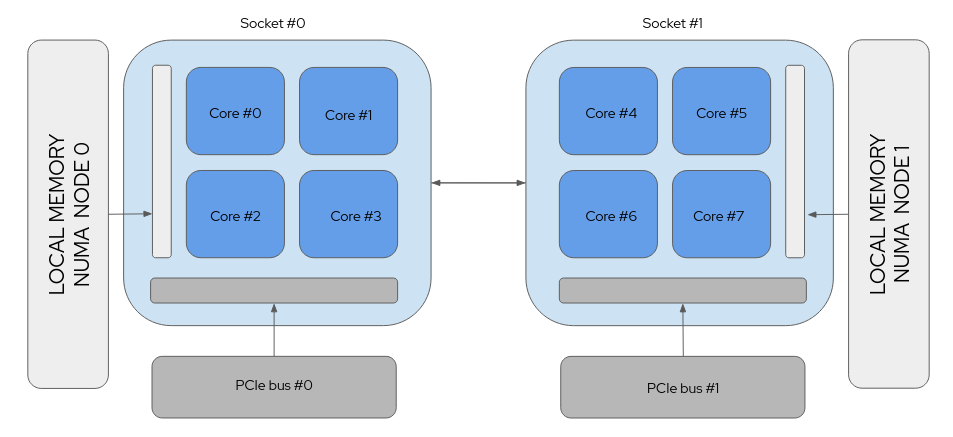
GPU Locality: in addition, GPUs are connected via the PCIe bus, so if your workload is running on the wrong socket, the data path between the CPU and GPU becomes a congested highway resulting in jitter or tail-latency
To add another dimension, the amount of NUMA Nodes per Socket is configurable on most systems via the UEFI/BIOS. There exists typically NPS levels of 1,2, and 4, meaning on a Dual Socket system you can configure up to 8 NUMA nodes. For our use case we configure our systems with a single NUMA node per socket, so 2 in total.
But Dual Socket Systems aren’t that complex, is this overkill?
Following SuperMicros announcement in May 2023 unveiling an 8 Socket Server based on Intel CPUs…
Supermicro Leads the Industry with the First Eight-Socket and Four-Socket Servers for the Most…
With Up To 480 Cores, 32TB of Memory, and 12 GPUs, These Systems Can Power Generative AI on SAP and Oracle Workflows in…www.supermicro.com
It seems Dual Sockets are only the beginning. The sooner we adapt our Kubernetes topology management in the fast growing world of bigger servers and larger workloads, the more prepared we will be moving forward.
Solving Resource Contention
When building and operating a Cloud Provider its imperative that when a customer requests 20 CPUs for their virtual instance, they get 20 cpus. In order to dedicate CPUs to instances, we’ll need to make the other stuff running on the system avoid them.
The traditional approach for that was the isolcpus kernel argument, but that’s deprecated and cpusets in cgroups are the way to go.
Previously when running our infrastructure on Openstack or Bare-Metal, we had a tedious approach involving:
Creating specific cgroups for different process types (system, instances, user)
Manual CPU pinning (taskset)
cpuset manipulation
Because we now operate inside Kubernetes, we can instead leverage three core components:
CPU Manager
Memory Manager
Device Manager
Coordinated by the Topology Manager
Kubernetes Topology Manager Deep Dive
Reference: Control Topology Management Policies on a node
The Topology Manager coordinates CPU, memory, and device allocation to ensure NUMA alignment. It acts as a central coordinator that polls three specific sub-managers to see what they have available:
CPU Manager: Decides which specific cores to assign (for Guaranteed QoS pods).
Memory Manager: Handles pinning memory pages to specific NUMA nodes.
Device Manager: Manages high-speed peripherals like GPUs or SR-IOV NICs.
Each manager sends back a Topology Hint, which is a bitmask saying, “I can satisfy this request using NUMA node 0 or node 1.”

The Topology Manager then merges these hints according to a configured policy.
Topology Manager Policies
The Topology Managers responsibility is to coordinates how resources are allocated across NUMA nodes. Its goal is to align CPUs, memory, and devices so workloads avoid costly cross-socket communication, but there is a tunable policy to dictate its strictness.
The Topology Manager supports several policies:
- none: No NUMA alignment is attempted. This is the default behavior and resources may come from any NUMA node.
- best-effort: Attempts to align resources on the same NUMA node, but does not strictly enforce it. If alignment is not possible, the pod is still admitted.
- restricted: Requires NUMA alignment when possible. If alignment cannot be achieved, the pod is rejected.
- single-numa-node: The strictest policy. All requested resources must come from a single NUMA node or the pod will not be scheduled.
Our Policy
Our goal as a cloud provider is to provide performance optimized resource allocation whenever possible, but ultimately we need to be flexible enough to account for instance requests which span well beyond a single NUMA node, therefore we chose to use the best-effort policy.
This is the configuration we are currently using in our kubelet configuration, please consult the kubernetes documents to understand the purpose of the reserved memory/cpu requirements.
cpuManagerPolicy: static
memoryManagerPolicy: Static
topologyManagerPolicy: best-effort
topologyManagerScope: pod
reservedSystemCPUs: "0,64"
kubeReserved:
  cpu: "3"
  memory: "2Gi"
systemReserved:
  cpu: "1"
  memory: "1Gi"
evictionHard:
  memory.available: "1Gi"
  nodefs.available: "10%"
  imagefs.available: "15%"
reservedMemory:
- numaNode: 0
  limits:
    memory: "2Gi"
- numaNode: 1
  limits:
    memory: "2Gi"
Important: Guaranteed QoS Requirement
Reference: Kubernetes Pod Quality of Service Classes
Topology Manager alignment only works reliably for pods in the Guaranteed QoS class.
This requires that CPU and memory requests exactly match their limits, for example:
resources:
  requests:
    cpu: "4"
    memory: "8Gi"
  limits:
    cpu: "4"
    memory: "8Gi"
When a pod is in the Guaranteed class:
the CPU Manager assigns exclusive CPU cores
the Memory Manager can enforce NUMA-local allocations
the Topology Manager can coordinate resource placement across subsystems
Pods in the Burstable or BestEffort QoS classes do not receive these guarantees, and their resources may be spread across NUMA nodes even when a topology policy is enabled.
The Hidden Problem: not all processes belong to the Customer
If we look at all the running processes within the container which manages the hypervisor responsible for running the customers virtual machine, we see something like this:
gpu-instance:/# ps
PID   USER     TIME  COMMAND
    1 root      0:00 instance-runner
   24 dnsmasq   0:00 dnsmasq
   30 root      5:08 qemu-system-x86_64
   35 root      5:08 virtiofsd
   37 root      0:00 bash
   43 root      0:00 ps
Even though Kubernetes gave the pod exclusive CPUs, all processes inside the pod share those CPUs.
That includes:
vCPU threads (customer workload)
I/O threads
QEMU management threads
Runtime threads from our controller
virtiofsd (shared filesystem)
dnsmasq (DHCP server)
We needed isolation inside the container. Ideally we would like everything besides the QEMU vCPU threads to be running on other cores elsewhere, meaning, we need to move them to another cgroup.
About Control Group v2
As we discussed previously regarding the Pod Quality of Services classes, these classes are realized logically as different Cgroups by kubelet. Cgroups are a Linux Kernel feature that allows process to be organized into heirarchical groups to limit, account for, and isolate resource usage.
Lets take a look at the Cgroups currently present on our worker node:
/sys/fs/cgroup/kubepods.slice
|   |-- kubepods-besteffort.slice
|   |   |-- kubepods-besteffort-pod0233c9aa_e18f_4614_97ba_94606228ec2f.slice
|   |   |   |-- cri-containerd-56b896a784d2bcb4c4a1877bc9350e0c412d9af98ec185ad3989aad78da0fead.scope
|   |   |   `-- cri-containerd-f486e076c03e5d720e7cf05abafd4456bff78d250ee896014ce79d65fd631d7b.scope
|   |   |-- kubepods-besteffort-pod232fe706_7428_4502_b880_19f28aa8ca3d.slice
|   |   |   |-- cri-containerd-4623cf1d300610228d5926a1f0c532dc9dd61db027d1d89a47a188e04871a73c.scope
|   |   |   |-- cri-containerd-72a8fb24580415a79e1b1b1142e6235ef61ca8ec2c2e7fec08da9574aea21810.scope
|   |-- kubepods-burstable.slice
|   |   |-- kubepods-burstable-pod332102fa_8018_4db4_9acc_50dd2f3a3460.slice
|   |   |   |-- cri-containerd-4fde7a33f9dc03c0d52d582266597e8f89d4d2bed6fd27232709eeb2dd34be0c.scope
|   |   |   |-- cri-containerd-7aca7509f4d290a8bcb7280c929cc85411fc803302dccf768aad3d937a169e95.scope
|   |-- kubepods-pod3ceda12c_3ee9_40fa_9f42-61428fe654a6.slice
|   |   |-- cri-containerd-0e16c65fb6a8d15dbd90aa3f1e07f6ba709d1adb47eee0af5aa6d1f92ffd4d04.scope
|   |   |-- cri-containerd-b02c37e654f2f8356cf2641f75a94194ecf3b8dbdb38d61de3644a67e49045a2.scope
|   |   `-- cri-containerd-eb6218013c1ba67fc5288216059150c3d8946da7ad6dd8cfdc7516621d80c260.scope
Here we see the three different QoS classes we previously described existing as different cgroup slices (unit of cgroups managed by systemd). Within each cgroup slice we see pods, and within those pods the individual containers.
For burstable and best-effort pod cgroups you wont see much in terms of resource definitions, since kubelet and the topology manager dont provide any garauntees on resource isolation, however you will see limits in place such as memory.max
root@worker1:/sys/fs/cgroup# cat kubepods.slice/kubepods-burstable.slice/kubepods-burstable-pod332102fa_8018_4db4_9acc_50dd2f3a3460.slice/cri-containerd-4fde7a33f9dc03c0d52d582266597e8f89d4d2bed6fd27232709eeb2dd34be0c.scope/memory.max
1073741824
However for our garaunteed pods you will see something more interesting, you will see cpuset.cpus defining the specific cpus kubelet is reserving for the instance (in this case 4 cpus, 14–17)
root@worker1:/sys/fs/cgroup# cat kubepods.slice/kubepods-pod416de7c2_21de_472d_817c_fa9d4306cb7d.slice/cri-containerd-5baab67f1daf9297c60974e50ad9f94f288077161a7c41376478e79aae671e07.scope/cpuset.cpus
14-17
When a guaranteed pod is created, kubelet refers to its list of all currently guaranteed cpus in its /var/lib/kubelet/cpu_manager_state, subtracts however many cpus are being requested from its defaultCpuSet, allocates this for the requested pod, and then subtracts these cpus from every burstable and best-effort pods cgroup.
Lets take a look.
Currently our kubelet’s cpu_manager_state show us we have cpus 2–11 on this 20 core system for shared use and the rest are reserved for instances
{
  "policyName": "static",
  "defaultCpuSet": "2-11",
  "entries": {
    "3ceda12c-3ee9-40fa-9f42-61428fe654a6": {
      "instance": "0-1,12-13"
    },
    "416de7c2-21de-472d-817c-fa9d4306cb7d": {
      "instance": "14-17"
    },
    "b41f38d8-2c21-4168-af77-6d0cc5482dcb": {
      "instance": "18-19"
    }
  },
  "checksum": 3944432841
}- If we look at the cpusets allocated to the burstable and best-effort cgroups, they should coincide with the default cpu set:
root@worker1:/sys/fs/cgroup# cat kubepods.slice/kubepods-besteffort.slice/kubepods-besteffort-pod0233c9aa_e18f_4614_97ba_94606228ec2f.slice/cri-containerd-f486e076c03e5d720e7cf05abafd4456bff78d250ee896014ce79d65fd631d7b.scope/cpuset.cpus
2-11
root@worker1:/sys/fs/cgroup# cat kubepods.slice/kubepods-burstable.slice/kubepods-burstable-pod332102fa_8018_4db4_9acc_50dd2f3a3460.slice/cri-containerd-4fde7a33f9dc03c0d52d582266597e8f89d4d2bed6fd27232709eeb2dd34be0c.scope/cpuset.cpus
2-11
So how can we isolate the threads within our cgroup from one another?
Use threaded cgroups?
A simple solution to isolate our worker threads from all the other processes running within our Pod would be to simply create two children cgroups of the current cgroup our Pod belongs to, make them threaded cgroups, and split the threads between them.
However, there exists a limitation within Control Groups v2, in that when certain domain controllers are enabled, children cgroups cannot be threaded due to lack of supporting control over sub-resources.
Currently, the following controllers are threaded and can be enabled in a threaded cgroup:
- cpu
- cpuset
- perf_event
- pids
What this means, is that since we have the memory manager enabled, this is not an option (requires hugetlb and memory controllers)
root@worker1:/sys/fs/cgroup# cat kubepods.slice/kubepods-pod416de7c2_21de_472d_817c_fa9d4306cb7d.slice/cgroup.subtree_control
cpuset cpu io memory hugetlb pids rdma misc
As a result of these limitations, in order to accomplish our goal we must develop our own solution.
Instance Cgroup Controller
To outline the overall approach, first we will define the goals and criteria for what we want to accomplish.
Create an Instance Cgroup controller which we will deploy as a daemonset on all worker nodes
The Instance Cgroup controller will create a float cgroup and will allow for Instances to register new cgroups.
New cgroup registration will take parameters read from the current instances cgroup (cpuset)
Develop our Instance Runner to then move all processes to the newly registered cgroup
All non QEMU worker pids/threads should be placed within the float cgroup, and all vCPU threads should placed in the registered cgroup
Deregistration and placing pids back in original place during teardown
An architecture of this approach can be seen below:
Step 1: Setup Instance Cgroup Controller
The Instance Cgroup Controller is responsible for managing CPU topology and cgroup placement for all virtual machine instances running on a node. Conceptually, it acts as a local resource coordinator that sits between the instance lifecycle manager and the Linux kernel’s cgroup interfaces.
The primary goals of the controller are:
Create and maintain cgroup heirarchy for float processes and instances
Registration and deregistration API for Instance Runner
Reconcile cpusets and cgroups statelessly, and manage cleanup
Establishing the Cgroup Hierarchy
The controller manages a dedicated subtree under the system cgroup hierarchy. The structure looks like:
stelia/
 ├─ instance-<pod-uuid>/
 ├─ float/
stelia/ is the root cgroup managed by our runtime.
instance-
float/ is a shared execution pool where processes temporarily run before they are pinned to dedicated CPUs.
The next step will be to enable the required domain controllers for this cgorup heirarchy and then make these sub cgroups (float, instances) threaded cgroup types.
It is important to note, that we will only be enabling the cpuset domain controller in our cgroup hierarchy, as we are allocating hugepages to our virtual machine. Hugepage allocation will remain static as its bound to process at start time, so this should not be effected when pid is moved, as well the stelia cgroup does not have a hugetlb controller enabled (doesn’t exist for threaded cgroups) so the kernel should not touch these resources.
Setting this up in Rust will appear as follows:
use std::fs;
use std::io::Result;
use std::path::Path;

/// Ensure the stelia cgroup topology exists and is configured correctly.
fn ensure_topology(
    stelia_cgroup: &Path, // e.g. /sys/fs/cgroup/stelia
    float_cgroup: &Path, // e.g. /sys/fs/cgroup/stelia/float
    total_cpus: &str, // e.g. "0-19 (from cpu_manager_state)"
    mems: &str, // e.g. "0,1" number of memory domains (from memory_manager_state)"
) -> Result<()> {

    // Create the root stelia cgroup
    fs::create_dir_all(stelia_cgroup)?;

    // Configure cpuset settings for the root cgroup
    fs::write(stelia_cgroup.join("cpuset.mems"), mems)?;
    fs::write(stelia_cgroup.join("cpuset.cpus"), total_cpus)?;

    // Enable cpuset controller for children
    fs::write(stelia_cgroup.join("cgroup.subtree_control"), "+cpuset")?;

    // Create the shared "float" cgroup
    fs::create_dir_all(float_cgroup)?;

    // Configure the float cgroup
    fs::write(float_cgroup.join("cgroup.type"), "threaded")?;
    fs::write(float_cgroup.join("cpuset.mems"), mems)?;
    fs::write(float_cgroup.join("cpuset.cpus"), total_cpus)?;

    Ok(())
}
Registration and Deregistration endpoints
Using JSON-RPC over a Unix domain socket is a good fit for communication between the Instance Runner and the Instance Cgroup Controller because it provides a lightweight RPC mechanism without introducing unnecessary networking overhead. Since both components run on the same node, there is no need to traverse the full IP or HTTP networking stack and can instead communicate through a Unix filesystem socket.
A simplified JSON-RPC request used by the Instance Runner might look like, where the Instance Runner will provide its pod uuid and cpuset:
{
  "jsonrpc": "2.0",
  "method": "registerCgroup",
  "params": {
    "uuid": "123",
    "cpuset": "4-7"
  },
  "id": 123
}
The controller responds with the newly registered instance group path:
{
  "jsonrpc": "2.0",
  "result": {
    "cgroup_path": "/sys/fs/cgroup/stelia/instance-123"
  },
  "id": 123
}
Reconciliation Loop and Cleanup
Every time an event occurs (such as an instance registering or deregistering), the controller performs a reconciliation pass. The reconciliation process does two main things:
-
Recalculate Float CPUs
The float cgroup is updated using the current defaultCpuSet value from kubelet/var/lib/kubelet/cpu_manager_state. If the defaultCpuSet differs from the current cpuset which is assigned to the float cgroup, it is updated.
This is done by updating the/sys/fs/cgroup/stelia/float/cpuset.cpus{ "policyName": "static", "defaultCpuSet": "2-11", "entries": { "3ceda12c-3ee9-40fa-9f42-61428fe654a6": { "instance": "0-1,12-13" }, "416de7c2-21de-472d-817c-fa9d4306cb7d": { "instance": "14-17" }, "b41f38d8-2c21-4168-af77-6d0cc5482dcb": { "instance": "18-19" } }, "checksum": 3944432841 } -
Cleanup: Remove Stale Cgroups
Stale instance cgroups are cleaned up if:
They do not appear in the kubelet CPU manager state
They contain no processesThis prevents resource leaks if an instance crashes or kubelet restarts. If the cgroups.procs and cgroups.threadsis empty, it can be considered stale and can be safely removed.
Step 2: Manage Processes from Instance Runner
Once the cgroup hierarchy and CPU topology are established, the Instance Runner becomes responsible for placing VM processes into the correct cgroups and assigning them CPUs.
The process typically involves the following steps:
Register with the Instance Cgroup controller
Move all PIDs to the float cgroup
Discover QEMU worker threads
Move QEMU worker threads to the instance cgroup
Pin QEMU worker threads to specific CPUs
Registering With the Controller
The instance runner is able to discover its pod-uuid and as well the cpuset allocated to this container/pod by reading from /proc/self as shown below:
gpu-instance:/# cat /proc/self/cpuset
/kubepods.slice/kubepods-podb9e4f71c_64a5_4f8d_8574_41363cbaf8e5.slice/cri-containerd-506962bc49f80b0ae7461edb1dbefdd626c4ece2b4bf103747a402982e91bf39.scope
gpu-instance:/# cat /sys/fs/cgroup/kubepods.slice/kubepods-podb9e4f71c_64a5_4f8d_8574_41363cbaf8e5.slice/cri-containerd-506962bc49f80b0ae7461edb1dbefdd626c4ece2b4bf103747a402982e91bf39.scope/cpuset.cpus
18-19
With this information the Instance Runner can construct a registration request over a JSON-RPC Unix domain socket which is provided as a volume mount to the Instance Runner pod. This provides a lightweight control plane without requiring shared state between components.
A typical registration request looks like:
{
  "jsonrpc": "2.0",
  "method": "registerCgroup",
  "params": {
    "uuid": "123"
    "cpuset": "4-7"
  },
  "id": 1
}
The response returns the assigned instance cgroup and CPU allocation.
Moving Processes Into the Float Cgroup
Now having received our newly registered cgroup, we want to first move all the processes within the container to the float cgroup (runs on shared cpus), with the goal of later moving the vcpu threads to the cpu isolated cgroup.
Lets take a look back at our process namespace from before, this is a list of all running processes in our container.
gpu-instance:/# ps
PID   USER     TIME  COMMAND
    1 root      0:00 instance-runner
   24 dnsmasq   0:00 dnsmasq
   30 root      5:08 qemu-system-x86_64
   35 root      5:08 virtiofsd
   37 root      0:00 bash
   43 root      0:00 ps
So to move these processes to the float cgroup, this is as simple as writing the process id to the float cgroup’s cgroup.procs file.
Example:
echo <pid> > /sys/fs/cgroup/stelia/float/cgroup.procsCaveat: Preventing Kubernetes Cgroup Cleanup
Because instances are launched inside Kubernetes pods, we must account for Kubelet’s cgroup reconciliation logic. Kubelet periodically cleans up cgroups that it believes are unused. If all processes are moved out of a container cgroup, the kubelet will delete it.
To prevent this, we keep a placeholder process inside the original Kubernetes cgroup. For this the Instance Runner will spawn an infinite sleep process within the container:
use std::process::Command;

fn spawn_placeholder() -> std::io::Result<()> {
    Command::new("sleep")
        .arg("infinity")
        .spawn()?;
    Ok(())
}
This process never participates in the instance runtime but acts as a cgroup anchor.
Discovering vCPU Threads via QMP
Now that all processes are moved into the float cgroup and are now able to utilize all cpus on the node, we need to now isolate our vcpu ‘worker’ threads. How do we discover these threads?
QEMU exposes runtime information through the QEMU Machine Protocol (QMP). We use this interface to discover the thread IDs for each virtual CPU. Specifically, we call the QMP command:
query-cpus-fast
This returns information about all active vCPU threads. In Rust, this might look like:
async fn try_get_vcpu_threads() -> Result<Vec<i32>> {
    let mut qmp = QmpClient::connect().await?;
    let response = qmp
        .execute("query-cpus-fast", None)
        .await
        .context("query-cpus-fast failed")?;

    let vcpus: Vec<QmpCpuInfo> = serde_json::from_value(response)?;

    debug!("Found {} QEMU vCPU threads", vcpus.len());

    Ok(vcpus.into_iter().map(|v| v.thread_id).collect())
}
Each returned thread_id corresponds to a Linux thread representing a QEMU vCPU.
Moving vCPU Threads to the Instance Cgroup
Once the vCPU thread IDs are known, they are moved into the instance cgroup, similar to how we moved processes before, however instead to cgroup.threads:
echo <tid> > /sys/fs/cgroup/stelia/sgcinstance-xxx/cgroup.threadsPinning Threads to Specific CPUs
After the threads are placed in the correct cgroup, the final step is to assign each thread a CPU affinity. This ensures:
minimal scheduling contention
NUMA locality (as provided by kubelet allocation)
Example Rust implementation:
use nix::sched::{sched_setaffinity, CpuSet};
use nix::unistd::Pid;

fn pin_thread(tid: i32, cpu: usize) -> nix::Result<()> {
    let mut set = CpuSet::new();
    set.set(cpu)?;
    sched_setaffinity(Pid::from_raw(tid), &set)
}
Each vCPU thread is pinned to one CPU from the instance’s allocated CPU set.
Resulting Process Layout
After initialization, the respective cgroups end up with a structure similar to this:
stelia/
├─ float/
│   └─ qemu
│   ├─ virtiofsd
│   ├─ dnsmasq
│   └─ instance runner
│
├─ instance-123/
│   └─ vcpu threads (pinned)
While the original Kubernetes pod still contains:
kubepods/
└─ pod-abc123/
    └─ placeholder (sleep infinity)
This approach allows us to combine Kubernetes lifecycle management with low-level CPU isolation, without fighting kubelet’s cgroup garbage collection logic.
Running on a Dual Socket System
So after all this work, what do the results look like on an actual Dual Socket system? After configuring the kubelet with the aforementioned configuration on our AMD Epyc with 128 cpus and 256 GiB of memory, lets first observe the numa domains of each cpu on the system, we have ~5.5k 2MB hugepages configured on each NUMA node (~113 GiB)
NUMA:
  NUMA node(s):              2
  NUMA node0 CPU(s):         0-31,64-95
  NUMA node1 CPU(s):         32-63,96-127
root@gpu-node:~# cat /sys/devices/system/node/node*/hugepages/hugepages-2048kB/nr_hugepages
55552
55296We will start by creating an instance with 40 cpus and 80 GiB of hugepages. If we look at the cpu and hugepage allocation from kubelet in our containers cgroup we see that the instances cpus and hugepages are localized to NUMA node 0:
root@gpu3:~# cat /sys/fs/cgroup/kubepods.slice/kubepods-podce32ebd2_f905_449e_b74b_4231a84b88e1.slice/cri-containerd-8a7496cc1fc043b490ebf3c3ec51d939cbeb988febb88a7c96b1dc871ae6a4e4.scope/cpuset.cpus
1-20,65-84
root@gpu-node:~# cat /sys/fs/cgroup/kubepods.slice/kubepods-podce32ebd2_f905_449e_b74b_4231a84b88e1.slice/cri-containerd-8a7496cc1fc043b490ebf3c3ec51d939cbeb988febb88a7c96b1dc871ae6a4e4.scope/hugetlb.2MB.numa_stat
total=8589934592 N0=8589934592 N1=0
After our controllers then complete their cgroup registration and process migrations, we can observe the following when running a script which checks for which cpuset a process may run on and which cpu they are currently running on. As we can see, every process is running on the defaultCpuSet (everything besides the allocated cpus for the instance) and there is a exactly 40 QEMU threads which are pinned to a dedicated cpu:
root@gpu3:~# ./pid_affinity.sh

######################################################################
Inspecting: dnsmasq
######################################################################

======================================================================
==== dnsmasq PID: 3794608 ====
======================================================================

==== dnsmasq cgroup ====
0::/stelia-io/float

==== dnsmasq main thread affinity ====
pid 3794608's current affinity list: 0,21-64,85-127

==== Listing dnsmasq threads ====

TID        THREAD_NAME               ALLOWED_CPUS         RUNNING_ON
---------- ------------------------- -------------------  ----------
3794608    dnsmasq                   0,21-64,85-127       39

######################################################################
Inspecting: QEMU
######################################################################

======================================================================
==== QEMU PID: 3794651 ====
======================================================================

==== QEMU cgroup ====
0::/stelia-io/float

==== QEMU main thread affinity ====
pid 3794651's current affinity list: 0,21-64,85-127

==== Listing QEMU threads ====

TID        THREAD_NAME               ALLOWED_CPUS         RUNNING_ON
---------- ------------------------- -------------------  ----------
3794651    qemu-system-x86           0,21-64,85-127       62
3794652    qemu-system-x86           0,21-64,85-127       124
3794654    qemu-system-x86           0,21-64,85-127       61
3794656    qemu-system-x86           1                    1
3794657    qemu-system-x86           2                    2
3794658    qemu-system-x86           3                    3
3794659    qemu-system-x86           4                    4
3794660    qemu-system-x86           5                    5
3794661    qemu-system-x86           6                    6
3794663    qemu-system-x86           7                    7
3794664    qemu-system-x86           8                    8
3794665    qemu-system-x86           9                    9
3794666    qemu-system-x86           10                   10
3794667    qemu-system-x86           11                   11
3794668    qemu-system-x86           12                   12
3794669    qemu-system-x86           13                   13
3794670    qemu-system-x86           14                   14
3794671    qemu-system-x86           15                   15
3794672    qemu-system-x86           16                   16
3794673    qemu-system-x86           17                   17
3794674    qemu-system-x86           18                   18
3794675    qemu-system-x86           19                   19
3794676    qemu-system-x86           20                   20
3794677    qemu-system-x86           65                   65
3794678    qemu-system-x86           66                   66
3794679    qemu-system-x86           67                   67
3794680    qemu-system-x86           68                   68
3794681    qemu-system-x86           69                   69
3794682    qemu-system-x86           70                   70
3794683    qemu-system-x86           71                   71
3794684    qemu-system-x86           72                   72
3794685    qemu-system-x86           73                   73
3794686    qemu-system-x86           74                   74
3794687    qemu-system-x86           75                   75
3794688    qemu-system-x86           76                   76
3794689    qemu-system-x86           77                   77
3794690    qemu-system-x86           78                   78
3794691    qemu-system-x86           79                   79
3794692    qemu-system-x86           80                   80
3794693    qemu-system-x86           81                   81
3794694    qemu-system-x86           82                   82
3794695    qemu-system-x86           83                   83
3794696    qemu-system-x86           84                   84
3794737    kvm-nx-lpage-re           0,21-64,85-127       52

######################################################################
Inspecting: Instance Runner
######################################################################

======================================================================
==== Instance Runner PID: 3794442 ====
======================================================================

==== Instance Runner cgroup ====
0::/stelia-io/float

==== Instance Runner main thread affinity ====
pid 3794442's current affinity list: 0,21-64,85-127

==== Listing Instance Runner threads ====

TID        THREAD_NAME               ALLOWED_CPUS         RUNNING_ON
---------- ------------------------- -------------------  ----------
3794442    instance-runner           0,21-64,85-127       85
3794456    tokio-runtime-w           0,21-64,85-127       40
3794457    tokio-runtime-w           0,21-64,85-127       83
3794458    tokio-runtime-w           0,21-64,85-127       12
3794459    tokio-runtime-w           0,21-64,85-127       10
3794460    tokio-runtime-w           0,21-64,85-127       10
3794461    tokio-runtime-w           0,21-64,85-127       82

==== Done ====
Conclusion
In this article, we showed how to run NUMA-localized, thread-isolated virtual machines in Kubernetes for AI and HPC workloads. By leveraging Kubernetes’ CPU, Memory, and Topology Managers, we preserve exclusive CPU ownership and NUMA locality. Our Instance Cgroup Controller and Instance Runner isolate vCPU threads from runtime processes, pinning them to the allocated CPUs. The result is deterministic performance, low latency, and strong tenant isolation, all while fully operating inside Kubernetes.
Limitations and Future Work
NUMA localization is critical for HPC and AI workloads. However, there is a known architectural limitation in Kubernetes:
Topology Manager Complexity
The Topology Manager merges NUMA hints using bitmask intersections. In worst-case scenarios, the merging algorithm has exponential characteristics:
O(2^n)
Where n = number of NUMA nodes.
Today, this is manageable as most production systems are dual-socket (2 NUMA nodes) and AMD EPYC commonly presents 2 NUMA domains per socket configuration
But future systems are changing:
4-socket systems
8-socket high-density compute nodes
CXL memory expansion
If Kubernetes runs on 8-socket NUMA systems, the current merging algorithm may become computationally expensive during scheduling.
And currently this is a known issue as the bitmask affinity suggestions as well dont seem to filter out non-preferential affinity assignments
Production-Grade Container Scheduling and Management - kubernetes/kubernetesgithub.com
When we create a 1-GPU pod on a machine with 8 NUMA nodes (AMD CPU + NVIDIA 4090D), the hint providers for CPU, memory, hugepages, and GPU each generate approximately 255 hints. During the hint merging phase, the topology manager needs to evaluate 255⁴ (over 4.2 billion) possible hint combinations. In our testing, this process took nearly 21 minutes.